
RoutePay Payment API
Welcome to the RoutePay Developer Portal.
Use this space to describe your platform at a high level: what it does, who it's for, and how the API fits into your product.
Getting started
Create a RoutePay account
Sign up on the RoutePay merchant portal and complete any required KYC so you can generate API credentials.
Obtain your API credentials
From the dashboard, generate your Client ID and Client Secret. Store them securely; you’ll use them to request an access token.
-
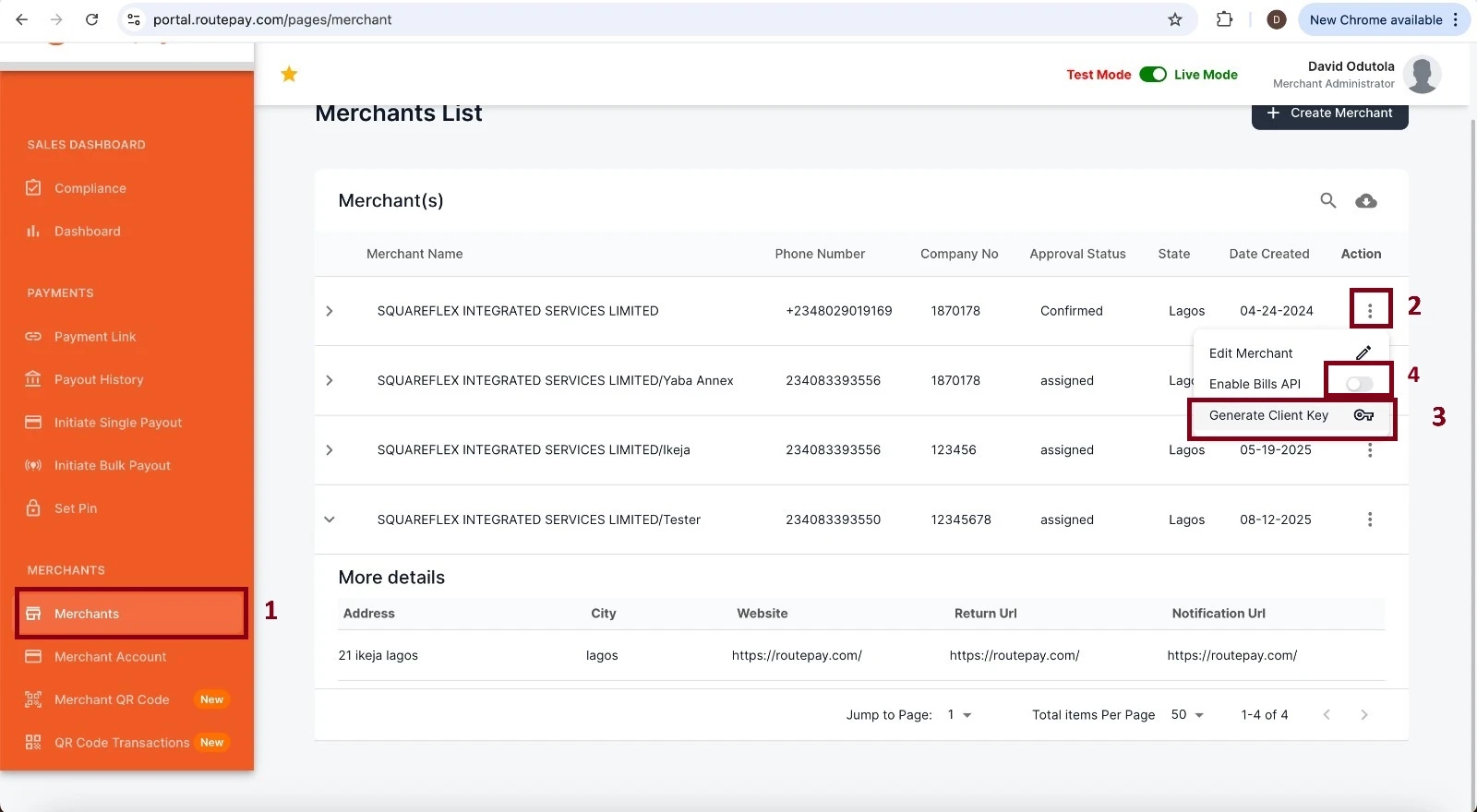
Log in to the RoutePay Merchant Portal.
-
Navigate to the Merchants section to view the list of all merchants.
-
Select the merchant for which you want to create an application.
-
Click the three-dots menu (⋮) next to the merchant.
-
Choose “Generate Client Secret” from the dropdown options.
-
The system will generate a ClientId and ClientSecret.
-
Copy and store these credentials securely — they are required for API integration.
Authenticate with the API
Use the Authentication endpoint to exchange your client credentials for an access_token:
POST https://auth{{Env}}.routepay.com/connect/token Content-Type: application/x-www-form-urlencoded
You can always jump into the full API reference for more details.
Common headers & conventions
- Use Content-Type: application/json for JSON payloads.
- Include Authorization: Bearer {{access_token}} for protected endpoints.
- Use merchantReference and transactionReference in your system to correlate requests and responses.
- Confirm successful payment using both HTTP 200 and payment-specific status values
Payment flow
Create payment (SetRequest)
Endpoint: POST {{baseUrl}}/payment/api/v1/Payment/SetRequest
POST {{baseUrl}}/payment/api/v1/Payment/SetRequest
Content-Type: application/json
Authorization: Bearer {access_token}
Request body example
{
  "merchantId": "{{ClientId}}",
  "returnUrl": "https://merchant.example.com/return",
  "merchantReference": "A1B2",
  "totalAmount": "500",
  "currency": "NGN",
  "paymentType": "PAYMENT",
  "customer": {
    "email": "test@example.com",
    "mobile": "0800000000",
    "firstname": "John",
    "lastname": "Doe",
    "username": "jdoe"
  },
  "products": [
    {
      "name": "product1",
      "unitPrice": "100",
      "quantity": 1
    }
  ]
}
Response sample
{
    "redirectUrl": "https://paymentqa.routepay.com/pay/2026020805182747256",
    "transactionReference": "2026020805182747256",
    "merchantReference": "2cf5ab3d-8366-4376-80c7-49e8a5fc3735",
    "responseCode": "00",
    "responseMessage": "success"
}
Redirect / Hosted payment page
Client should redirect the user to redirectUrl to complete the hosted payment flow (card checkout). The hosted page will handle card acceptance or other enabled payment methods.
Query transaction status
Endpoint: GET {{baseUrl}}/payment/api/v1/Payment/GetTransaction/{transactionReference}
Purpose: confirm final payment status. Rely on both the HTTP response and the paymentStatus in the response body. Also, you can use the endpoint below to query the transaction status using either your merchant transaction reference or the transaction reference returned during the callback.
Endpoint: GET {{baseUrl}}/payment/api/v1/Payment/get-transaction-record/{transactionReference}
Payment status codes
| Status Code | Meaning |
|---|---|
| 0 | Successful |
| 550 | Failed |
| 250 | Pending |
| 260 | Processing |
| 210 | Already Processed |
| 220 | Cancelled |
Error handling and idempotency
Treat non-2xx HTTP responses as errors. Log the full response and x-correlation-id (when present) for debugging.
Use merchantReference or transactionReference as idempotency keys on your side to prevent duplicate processing. The API will return AlreadyProcessed for duplicates in some flows.
If the payment returns an intermediate state (e.g., Pending/Processing), poll GetTransaction and avoid returning final confirmation to end-users until you see Successful or Failed.
Testing / Sandbox card data
Payment Approved: 5060990580000217498 — Expiry 05/2050, CVV 123
Payment Declined: 4242 4242 4242 4242 — Expiry 05/2050, CVV 123
Bills Payment flow
RoutePay exposes {{baseUrl}}/bills/api/v1/Payment/lookup and {{baseUrl}}/bills/api/v1/Payment/charge for operator lookups and charges.
You will need to enable the Bills Payment API feature from your merchant kebab menu.
Lookup (product info / bundle list)
Endpoint: POST {{baseUrl}}/bills/api/v1/Payment/lookup Checkout the API reference for full collection and examples
Common request body
{
  "billCode": "AIRTEL_BUNDLE",
  "payload": {}
}
Charge (execute payment)
Endpoint: POST {{baseUrl}}/bills/api/v1/Payment/charge
POST {{baseUrl}}/bills/api/v1/Payment/charge
Content-Type: application/json
Authorization: Bearer {access_token}
Request body example (airtime):
{
  "billCode": "AIRTEL",
  "merchantReference": "{{$guid}}",
  "transactionReference": "",
  "paymentMode": "purse",
  "externalReference": "6747843745",
  "payload": {
    "mobileNumber": "08077722222",
    "amount": "100"
  }
}
Response sample
{
  "status": 200,
  "responseCode": "00",
  "responseDescription": "Successful",
  "billsReference": "4664683003593395673",
  "merchantReference": "08979013-07ea-4d29-abe2-28838bcb4541"
}
Payout API
The Subaccounts API provides endpoints for creating and managing sub-accounts, checking balances, retrieving transaction history, and performing payouts or debits. All requests require JSON request bodies and return JSON responses.
Base URL: /api/v1/Subaccounts
Create Subaccount
POST /api/v1/Subaccounts
Description: Creates a new subaccount for a merchant user.
Request Body
{
  "merchantId": "string",
  "userId": "string",
  "accountName": "string",
  "bvn": "string",
  "alias": "string"
}
Response Sample
{
  "userId": "string",
  "accountName": "string",
  "accountNumber": "string",
  "status": "string",
  "responseCode": "string"
}
Error (400 – Bad Request):
{
  "isSuccess": false,
  "error": "string",
  "message": "string",
  "responseCode": "string"
}
Get Subaccount Details
GET /api/v1/Subaccounts/{id}
Path Parameter:
id (string, required) — Subaccount ID.
Response
{
  "isSuccess": true,
  "error": "string",
  "message": "string",
  "responseCode": "string",
  "value": {
    "accountName": "string",
    "accountNumber": "string",
    "availableBalance": 0,
    "currency": "string",
    "created": "2025-08-18T20:54:45.086Z"
  }
}
Get Subaccount Balance
GET /api/v1/Subaccounts/{accountNumber}/balance
Path Parameter: accountNumber (string, required) — Subaccount Number.
Response
{
  "isSuccess": true,
  "error": "string",
  "message": "string",
  "responseCode": "string",
  "value": {
    "accountName": "string",
    "accountNumber": "string",
    "availableBalance": 0,
    "currency": "string",
    "created": "2025-08-18T20:54:45.086Z"
  }
}
Get Transaction History
POST /api/v1/Subaccounts/{id}/GetTransactionHistory
Path Parameter: id (string, required) — Subaccount Number.
Request Body
{
  "endDate": "string",
  "startDate": "string",
  "merchantId": "string",
  "accountNumber": "string",
  "pageSize": 0,
  "pageNumber": 0,
  "disablePagination": true
}
Response
{
  "isSuccess": true,
  "error": "string",
  "message": "string",
  "responseCode": "string",
  "value": {
    "accountName": "string",
    "accountNumber": "string",
    "availableBalance": 0,
    "currency": "string",
    "created": "2025-08-18T20:54:45.090Z"
  }
}
Payouts
Transfer Funds
POST /api/v1/Subaccounts/{accountNumber}/payouts
Path Parameter: accountNumber (string, required) — Merchant AccountNumber.
Request Body
{
  "transferNarration": "string",
  "beneficiaryAccountNumber": "string",
  "beneficiaryAccountName": "string",
  "bankCode": "string",
  "bankName": "string",
  "amount": 0,
  "merchantReference": "string"
}
Response Body
{
  "isSuccess": true,
  "message": "Transfer successful",
  "responseCode": "00"
}
Debits
POST /api/v1/Subaccounts/{accountNumber}/debits
Path Parameter: accountNumber (string, required) — Subaccount Number.
Request Body
{
  "transferNarration": "string",
  "amount": 0,
  "transferReference": "string"
}
Response Body
{
  "isSuccess": true,
  "message": "Debit successful",
  "responseCode": "00"
}
Generate Customized QR Dynamic Payment Link
This API generates a customized QR code for a payment request to a merchant. The QR code can be scanned by customers to initiate and complete payment.
Endpoint
Post: {baseurl}/api/v1/QRCode/GenerateCustomizedQRDynamicPaymentLink Authentication Type: Bearer Token (JWT) Header: Authorization: Bearer <your_access_token>
Request Format
The API accepts a multipart/form-data payload.
Parameters
| Field | Type | Required | Description |
|---|---|---|---|
| dynamicName | string | Yes | A dynamic identifier for the QR code (e.g., customer name, label). |
| amount | decimal | Yes | The payment amount to be linked to the QR code. |
| durationInSeconds | number | Yes | Expiry duration of the QR code in seconds (e.g., 259200 = 3 days). |
| merchantReference | string | Yes | Merchant’s unique reference for tracking the transaction. |
| merchantLogo | file | Yes | Merchant’s logo image (must be PNG format). |
| returnUrl | string | Yes | The callback URL to redirect after payment is completed. |
| verifyMe | boolean | No | Flag to enable extra verification on the payer (default: true). |
Example curl Request
curl --location '{baseurl}/api/v1/QRCode/GenerateCustomizedQRDynamicPaymentLink' \
--header 'Authorization: Bearer <your_access_token>' \
--form 'DynamicName="Rli"' \
--form 'Amount="2500"' \
--form 'DurationInSeconds="259200"' \
--form 'MerchantReference="INV-20251001-1246"' \
--form 'MerchantLogo=@"///Mac/Home/Downloads/download.png"' \
--form 'ReturnUrl="https://routepay.com "' \
--form 'VerifyMe="true"'
Response
{
  "value": {
    "qrCode": "https://staging.qr.routepay.com/QrCodes/images/175940007568de508b0c114.png",
    "transactionReference": "2025100211141581551"
  },
  "isSuccess": true,
  "error": "",
  "message": null,
  "responseCode": null
}
Response Fields
| Field | Type | Description |
|---|---|---|
| value.qrCode | string | URL link to the generated QR code image (PNG). |
| value.transactionReference | string | Unique reference ID for the generated payment transaction. |
| isSuccess | boolean | Indicates if the request was processed successfully. |
| error | string | Error message if the request failed. |
| message | string | Additional message details. |
| responseCode | string | Response code. |
Error Responses
| Code | Description |
|---|---|
| 400 | Bad request (missing/invalid parameters). |
| 401 | Unauthorized (invalid or missing bearer token). |
| 415 | Unsupported media type (invalid file format, only PNG is allowed). |
| 403 | Forbidden (insufficient permissions). |
| 404 | Not Found (invalid merchant reference). |
| 500 | Internal Server Error (unexpected error). |
Notes
MerchantLogo must be PNG format, otherwise the request will fail with a 415 Unsupported Media Type. The generated QR code is time-limited based on the DurationInSeconds parameter. Always store and track the transactionReference for reconciliation.
Webhook URL Configuration
URL Format
Your webhook URL should be configured to receive events as a query string parameter:
https://your-domain.com/webhook-endpoint
When events are sent, they will be delivered to:
https://your-domain.com/webhook-endpoint?event=payment
https://your-domain.com/webhook-endpoint?event=payment.failed
https://your-domain.com/webhook-endpoint?event=refund.processed
Supported Event Types
| Event Type | Description | When Sent |
|---|---|---|
payment | Payment transaction completed successfully (payment successful or failed). | When a payment reaches a final successful state (e.g., SUCCESS/00). |
credit | Merchant account or virtual account credited (funds deposited). | When funds are credited to the merchant's account or designated virtual account. |
debit | Merchant account or virtual account debited (funds withdrawn). | When funds are debited from the merchant's account (payouts, reversals, or fees). |
settlement | Settlement batch posted summarising net amounts settled to the merchant. | When a settlement run is finalised and posted for the merchant/account. |
payout | Internal or external transfer between accounts completed. | When a transfer (payout or internal transfer) completes successfully. |
Step 1: Create Your Webhook Endpoint
Create an HTTP endpoint on your server that can:
- Accept
POSTrequests - Process JSON payloads
- Handle authentication
- Return appropriate HTTP status codes
Example Webhook Endpoint (Node.js/Express):
const express = require('express');
const crypto = require('crypto');
const app = express();

app.use(express.json());

// Your webhook endpoint
app.post('/webhook-endpoint', (req, res) => {
  try {
    // Extract event type from query string
    const eventType = req.query.event;
    console.log(`Received event: ${eventType}`);

    // Extract webhook headers
    const signature = req.headers['x-webhook-signature'];
    const timestamp = req.headers['x-webhook-timestamp'];
    const merchantId = req.headers['x-merchant-id'];
    const messageId = req.headers['x-message-id'];

    // Verify webhook signature (recommended for security)
    const webhookSecret = merchantId; // Use merchant ID directly as secret
    if (!verifySignature(req.body, signature, webhookSecret)) {
      console.error('Invalid webhook signature');
      return res.status(401).json({ error: 'Invalid signature' });
    }

    // Check for replay attacks (optional but recommended)
    const currentTime = Math.floor(Date.now() / 1000);
    const messageTime = parseInt(timestamp);
    if (Math.abs(currentTime - messageTime) > 300) { // 5 minutes tolerance
      console.error('Webhook timestamp too old');
      return res.status(401).json({ error: 'Timestamp too old' });
    }

    // Process the webhook payload
    const payload = req.body;

    // Handle different event types
    switch (eventType) {
      case 'payment.completed':
        handlePaymentCompleted(payload);
        break;
      case 'payment.failed':
        handlePaymentFailed(payload);
        break;
      case 'refund.processed':
        handleRefundProcessed(payload);
        break;
      default:
        console.log(`Unhandled event type: ${eventType}`);
    }

    // Return success response
    res.status(200).json({ status: 'received' });

  } catch (error) {
    console.error('Webhook processing error:', error);
    res.status(500).json({ error: 'Processing failed' });
  }
});

function verifySignature(payload, signature, secret) {
  // Extract timestamp from the webhook headers
  const timestamp = req.headers['x-webhook-timestamp'];

  // Create the payload string that was signed: merchantId:timestamp:jsonData
  const payloadString = `${payload.merchantId}:${timestamp}:${JSON.stringify(payload)}`;

  // Generate HMAC-SHA256 signature
  const hmac = crypto.createHmac('sha256', secret);
  hmac.update(payloadString);
  const expectedSignature = hmac.digest('hex');

  // Compare signatures (use constant-time comparison for security)
  return crypto.timingSafeEqual(
    Buffer.from(signature, 'hex'),
    Buffer.from(expectedSignature, 'hex')
  );
}

function handlePaymentCompleted(payload) {
  // Your business logic for completed payments
  console.log('Payment completed:', payload.transactionId);
}

function handlePaymentFailed(payload) {
  // Your business logic for failed payments
  console.log('Payment failed:', payload.transactionId);
}

function handleRefundProcessed(payload) {
  // Your business logic for processed refunds
  console.log('Refund processed:', payload.refundId);
}

app.listen(3000, () => {
  console.log('Webhook server running on port 3000');
});
Step 2: Configure Your Webhook URL
Contact RoutePay support or use the merchant portal to configure your webhook URL:
Required Information:
- Webhook URL:
https://your-domain.com/webhook-endpoint - Authentication Method: Basic Auth or None
- Username (if using Basic Auth): Your chosen username
- Password (if using Basic Auth): Your chosen password
Sample Webhook Payload (JSON) for credit, debit, payout, settlement
{
  "accountNumber": "0123456789",
  "remarks": "Payment for order #INV-1029",
  "transactionAmount": 15000.00,
  "settledAmount": 14500.00,
  "feeAmount": 400.00,
  "vatAmount": 100.00,
  "merchantReference": "INV-1029",
  "transactionReference": "TXN-20260201-ABC123",
  "transactionDateTime": "2026-02-01T14:32:45Z",
  "notificationType": "TRANSACTION",
  "status": "SUCCESS"
}
Field Definitions
| Field Name | Type | Required | Description |
|---|---|---|---|
| accountNumber | string | No | Customer or virtual account number associated with the transaction |
| remarks | string | No | Additional transaction description or narration |
| transactionAmount | decimal | Yes | Total amount paid by the customer |
| settledAmount | decimal | Yes | Net amount settled to the merchant after deductions |
| feeAmount | decimal | Yes | Transaction processing fee charged |
| vatAmount | decimal | Yes | VAT applied to the transaction fee |
| merchantReference | string | No | Merchant's unique reference for tracking the transaction |
| transactionReference | string | Yes | Unique reference ID for the transaction |
| transactionDateTime | datetime (ISO 8601) | Yes | Transaction timestamp |
| notificationType | string | Yes | Type of webhook notification (e.g. TRANSACTION, REVERSAL) |
| status | string | Yes | Transaction status (SUCCESS, FAILED, PENDING) |
Sample Webhook Payload (JSON) for payment
{
  "transactionId": 2026030510045954738,
  "merchantId": "KvzzjGWKzSNKAew",
  "amount": 500.00,
  "totalAmount": null,
  "feeAmount": 0.00,
  "paymentStatus": "Pending",
  "merchantReference": "6c14ed89-7692-4fc0-a378-8d439552339d",
  "currency": "NGN",
  "transactionDate": "2026-03-05T10:04:59.6044499",
  "processedDate": "0001-01-01T00:00:00",
  "paymentDescription": "Pending",
  "cardTransaction": null,
  "paymentMethod": null
}
| Field Name | Type | Description |
|---|---|---|
| transactionId | long | Transaction reference |
| merchantId | string | Merchant Id |
| amount | decimal | Total amount paid by the customer |
| totalAmount | decimal | Total amount paid by the customer |
| feeAmount | decimal | Transaction processing fee charged |
| paymentStatus | string | Payment status for transaction |
| merchantReference | string | Merchant's unique reference for tracking the transaction |
| currency | string | Transaction currency |
| transactionDate | datetime (ISO 8601) | Transaction timestamp |
| processedDate | string | Processed Timestamp |
| cardTransaction | object | Card information object |
| paymentMethod | string | Transaction payment method |
Transfer API
This API facilitates the secure movement of funds from an internal source account to an external beneficiary. It includes an integrated security step that retrieves the beneficiary's registered details to ensure the sender can verify the recipient's identity before the transaction is finalised.
The Workflow
Step 1: Source Debit – The API identifies the sender's existing account within our system to be debited for the transfer amount. Step 2: External Name Verification – The API performs a real-time lookup using the beneficiary's account details to retrieve the official name registered with the receiving bank. Step 3: Detail Retrieval – The verified beneficiary information is returned to the client. Step 4: Execution – The system uses the verified information to route the funds from the source account to the external destination.
Account Name Verification
Before initiating a transfer, you must perform a name check to verify the beneficiary’s account details. This ensures the account number and bank code are valid and returns the beneficiary’s account name.
Endpoint
POST {baseUrl}/api/v1/transfer/verify
Request Body
{
"transferType": "string",
"accountNumber": "string",
"bankCode": "string"
}
| Field Name | Type | Required | Description |
|---|---|---|---|
| transferType | string | Yes | Type of transfer |
| accountNumber | string | Yes | Beneficiary account number |
| bankCode | string | Yes | Destination bank code |
Response Body
{
"verificationId": "string",
"beneficiaryAccountNumber": "string",
"beneficiaryAccountName": "string",
"bankCode": "string",
"bvn": "string"
}
| Field Name | Type | Description | |------------|------|----------|-------------| | verificationId | string | Unique ID for the verification request | | beneficiaryAccountNumber | string | Verified account number | | beneficiaryAccountName | string | Verified account name | | bankCode | string | Bank code | | bvn | string | Beneficiary BVN (if available) |
⚠️Important:
You must use the verified beneficiaryAccountName and beneficiaryAccountNumber returned from the name check when initiating the transfer.
Send
This endpoint is used to initiate a transfer after successful name verification.
Endpoint
POST {baseUrl}/transfer/send
Request Body
{
"transferNarration": "string",
"beneficiaryAccountNumber": "string",
"beneficiaryAccountName": "string",
"bankCode": "string",
"bankName": "string",
"amount": 0,
"merchantReference": "string",
"merchantId": "string",
}
| Field Name | Type | Required | Description |
|---|---|---|---|
| transferNarration | string | Yes | Description of the transaction |
| beneficiaryAccountNumber | string | Yes | Verified beneficiary account number |
| beneficiaryAccountName | string | Yes | Verified beneficiary account name |
| bankCode | string | Yes | Destination bank code |
| bankName | string | Yes | Destination bank name |
| amount | number | Yes | Amount to transfer |
| merchantReference | string | Yes | Unique merchant reference |
| merchantId | string | Yes | Merchant unique identifier |
Response
{
"isSuccess": true,
"error": "string",
"message": "string",
"responseCode": "string",
"validationErrors": [
"string"
]
}
| Field Name | Type | Description |
|---|---|---|
| isSuccess | boolean | Indicates if the transfer request was successful |
| error | string | Error message |
| message | string | Additional information about the transaction |
| responseCode | string | Transaction response code |
| validationErrors | array | List of validation errors (if any) |
Transfer Status
This endpoint is used to get transfer status using transaction reference or merchant reference.
Endpoint
GET {baseUrl}/transfer/status/{transactionReference}
Environments
- Sandbox:
https://apidev.routepay.com - Production:
https://api.routepay.com
Postman collection & developer tools
A Postman collection with the full set of requests (auth, bills, payment) is available to import into Postman.
Use the environment variables baseUrl, ClientId, ClientSecret, and accessToken to run the collection.
You can also use jump to the API Reference to view the full set of requests.
Security & best practices
Do not embed ClientSecret in client-side code. Keep it on your backend.
Use TLS for all traffic (HTTPS required).
Store access tokens securely and refresh when expired.
Validate webhook/callback signatures if RoutePay issues callbacks (contact support to confirm your account's webhook setup).
Support & contact
If you need help or notice unexpected behaviour, capture and share the following when contacting RoutePay support (support@routepay.com):
- merchantReference and transactionReference
- Timestamp of the request (UTC)
- x-correlation-id header (if present)
- Full request/response bodies (redact sensitive card data)
Next steps
- Learn more about BillsPayment API flows.
- Learn how to manage subaccounts and payouts from PayOut API.